🔥 How do our beliefs about assessment shape absolutely everything we do?
🔥 How has it become acceptable to do nothing in a classroom, and what can we do about it?
Join me for a conversation with Melissa Dean as we dig into these and other critical questions.
About this Guest: Melissa is a high school math, science and ELA teacher who is passionate about reforming assessment and reimagining mathematics education. She is a developing inquiry and design thinking teacher who is constantly in reflection about her teaching practice and the state of education. She’s also the author of Unravel School: Reimagine Classrooms, Reinvent Assessment and Revive Learning.
Timestamps from this conversation:
0:00:00 – Today’s guest is Melissa Dean, the Dean of Math
1:12 – A pivotal story of futility in the Math classroom
4:20 – Assessment is everything in education reform
10:37 – What’s the difference between grading and assessment?
🔥 How can we live, work, and serve others in alignment with our assignment?
🔥 How can we clear away the clutter of our lives and move our personal mission toward success?
Join me for this conversation with CHIP BAKER as he shares his insights.
ABOUT THIS GUEST: Chip is a fourth generation educator who has now served as a teacher and coach for over twenty-four years. He is a multiple time best-selling author, Youtuber, podcaster, transformational speaker and life coach. Find more from him at The Success Chronicles. You can follow Chip on X @ChipBaker19.
Tune in for my regular Teachers on Fire interviews, airing LIVE on YouTube every Saturday morning at 8:00am Pacific and 11:00am Eastern! Join the conversation and add your comments to the broadcast.
In This Conversation:
1:04 – How adversity has shaped Chip’s journey and mission
2:14 – What Chip’s legacy as a fourth generation educator means to him
Learning targets take some good-natured abuse these days on TikTok and Instagram reels. And hey, I can chuckle at some of the shots.
No, learning targets won’t save your life. They won’t solve your classroom management problems. Simply posting them on the wall won’t be enough to magically improve your students’ engagement and learning.
But I will absolutely insist that learning targets CAN save you time, mental energy, and sanity.
Here’s why and how in a nutshell. They can reduce, simplify, and focus your assessment activities.
Less is more.
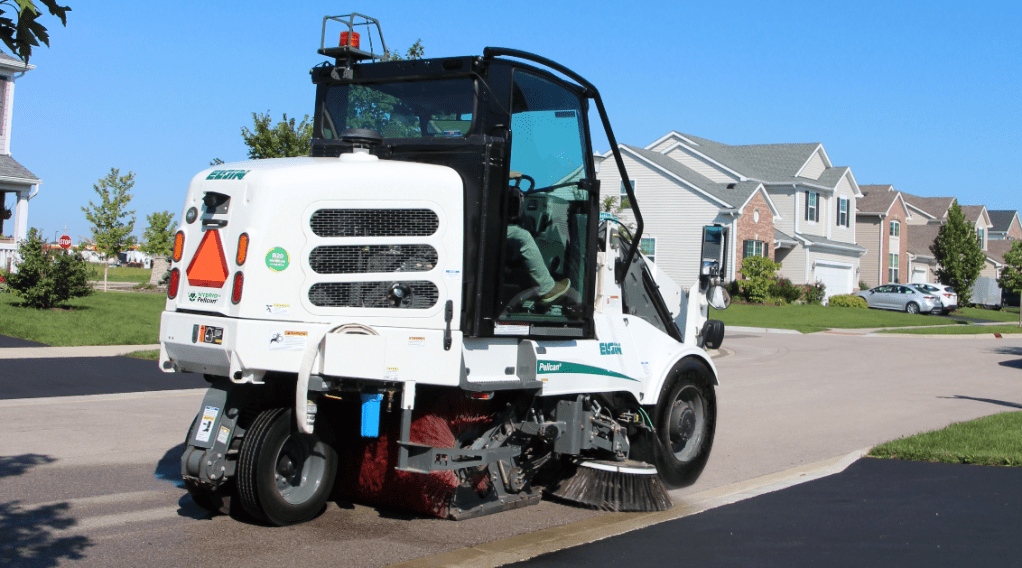
You’re not a street sweeper, teachers. It’s not your job to inhale everything in sight.
No, you’re an eagle-eyed detective. Instead of grading everything and every part of what your students do, you’re only looking for particular pieces of evidence.
And that, my friends, can make all the difference in the world.
Let me show you what I mean.
Example 1: A sixth grade solar system activity
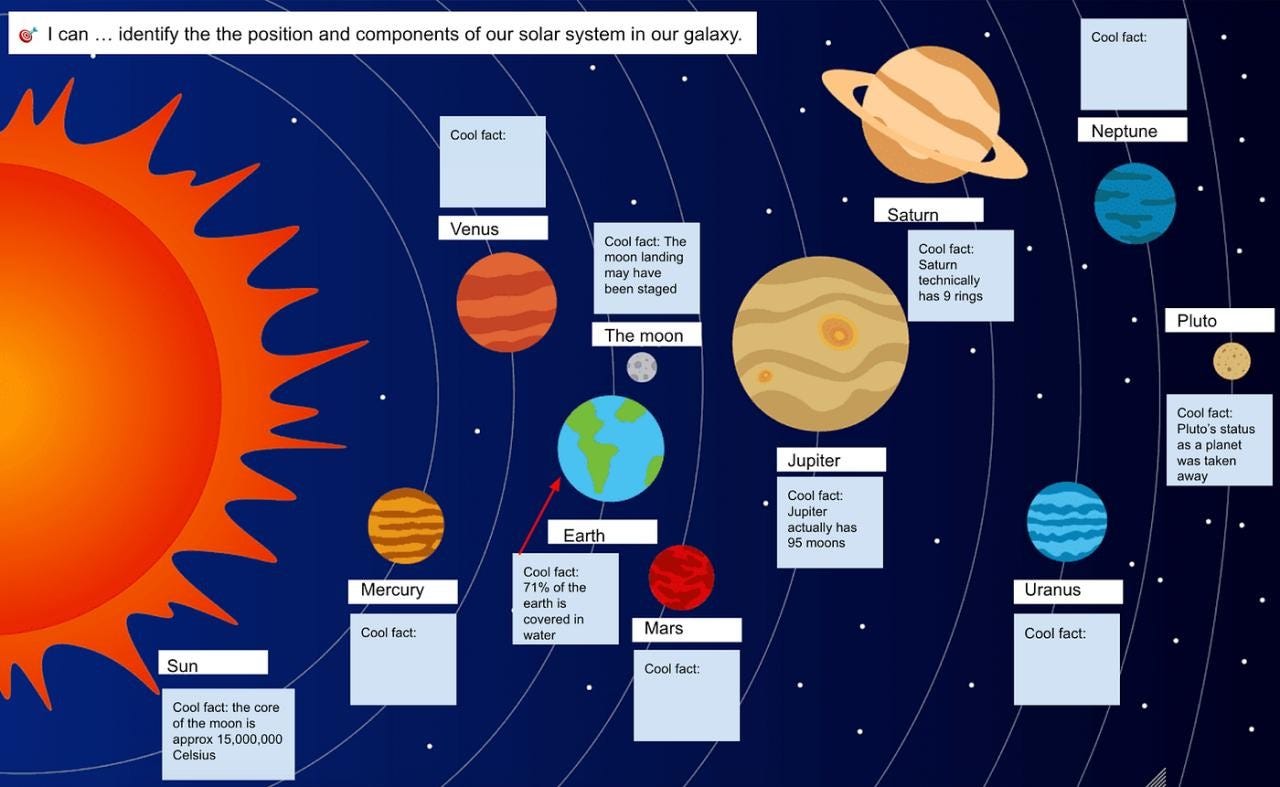
Let’s take this hypothetical learning activity for sixth grade Science students. I’ve asked students to 1) label each planet correctly and 2) use the text box feature to add one interesting fact about each planet, moon, and star.
Those are the activity instructions. But pay close attention to the learning target.
It’s taken from our sixth grade Science curriculum: 🎯 I can … identify the position and components of our solar system in our galaxy.
Now here’s the key. Does the learning standard require that students describe each major component of our solar system? Nope. That skill may appear elsewhere in the curricular documents, but not in this particular standard.
So am I going to take valuable minutes to verify each fact that my students decide to include for each celestial body? No, I am not.
All I need to do here is complete a quick scan to confirm that students have correctly identified the components of the solar system. That’s IT. That’s all the evidence I need.
So instead of taking 2–3 valuable minutes per student to carefully review (and research) each completed solar system poster, I’m taking about 5–10 seconds to verify that the names of the planets appear correctly.
I just cut my hour of assessment work down to two minutes, which may also mean that the assessment can be completed and recorded during class time (it depends on how you plan to use the data, of course).
Am I conning or cheating students by operating this way? Absolutely not. To suggest so is to suggest that asking my students to learn more about each planet is a waste of time.
It’s the old grades-as-wages mindset that says that students must be paid for any and every completed activity. It’s a terrible paradigm and it reinforces backward thinking about the value of learning.
Don’t fall for it.
Example 2: A fourth grade English activity
Let’s say that you’re teaching fourth grade English and you’ve just completed some learning around literary devices. You want to assess student learning against a classic learning target: 🎯I can … use similes properly in my writing.
Many kinds of learning activities would provide the evidence we need to assess student proficiency against this curricular standard. But let’s say that you choose to go with something quick and simple that requires students to do some writing: write three paragraphs about your family, using at least three similes effectively.
Students begin their writing, and — because you used the Google Classroom ‘Make a Copy for Every Student’ feature — you’re able to jump from one student’s work to the next in real time while they write, offering feedback and assessments of their learning as they write.
You read that correctly: you’re making assessments — not in the late hours of the evening after you’ve put your own kids to bed — but as they write. Here’s what I mean.
Let’s say I hop into Narissa’s Google Doc. She’s writing away, perhaps 1–2 paragraphs in. I’ll make sure to give her some quick encouragement. But I don’t have to stop there. If I can already spot three similes used effectively in context, I can assess her proficiency, record it, and move on.
Is Narissa’s third paragraph wasted if I don’t read it or never come back to it? Not at all. To suggest so is to suggest that students can’t benefit from writing by themselves, which is absurd.
Of course they can. Our students need to write so much more than they do today.
As teachers, we offer feedback, guidance, and encouragement when and where we’re able. But it’s silly to suggest that they can only grow when we’ve put their work in its entirety under our sacred magnifying glasses.
The big idea: learning targets tell us which evidence to examine
Remember: we’re not street sweepers, teachers. We’re detectives.
The next time you assess your students’ work, start with the learning target. Precisely which pieces of evidence do you need to examine carefully and thoughtfully?
Spend your mental energy on that, and — at least for this particular learning activity — ignore the rest.
You’ll be saving your sanity in the process.
Even better? Your students will receive feedback and assessments that are actually helpful.
And five other great resources that I’m keeping in mind.
Image Source: Canva Stock Library
My teaching assignment has shifted a little this year. Aside from an odd schedule-filling PE class, I teach nine classes of ADST in fifth through seventh grades (three classes per grade).
ADST stands for Applied Design, Skills, and Technologies. It’s a subject that one of my edu-heroes, John Spencer, would surely love.
The curriculum is simple and flexible. On the competencies side is the design process: understanding, defining, ideating, prototyping, testing, making, and sharing.
On the content side are a menu of modules that teachers and students are free to dive into and explore. They include computational thinking, computers and communication devices, digital literacy, drafting, 3D design, entrepreneurship and marketing, media arts, robotics, and more.
It’s a thrill to go to these spaces with elementary learners.
Students at this age are fearless. They’re curious. They’re ready to create anything. And they’re ready to expand their creative powers.
If you’re teaching in similar spaces, here is a list of tools, design challenges, and creative tasks that I’ve tried and recommend (I have no affiliation with any of these brands, products, or sites).
7 Creative Apps That I Use with My Elementary Design Students
1. LEGO Design Challenges and Creative Tasks
Partner building competition: tallest structure
Partner building design challenge: our dream home
I am blessed to have access to six LEGO carts on wheels — enough pieces to keep a class of 25 busy. It’s the timeless classic that gets kids talking, collaborating, and having fun right out of the gate in September. Time will evaporate quickly as they get to work with this creative masterpiece.
2. Canva Design Challenges and Creative Tasks
Google Classroom Header (a fun get-to-know-Canva activity)
Learning Map Poster (selfie, family, passions, areas of growth)
Other Posters: Remembrance Day, National Truth and Reconciliation Day, School Spirit Days
Logos: My Personal Logo, Our House Team Logo
Memes (positive messages that inspire others)
Image Variations: Animations, AI-Generated
YouTube Thumbnails
Videos (yes, Canva has a video editor, including an enormous stock library)
Comic Strips
Canva for Education accounts are free for teachers and their students — still an unbelievably good deal. If you and your school still don’t have these accounts, get on it immediately.
3. Pixlr Design Challenges and Creative Tasks
Cropping
Color and texture adjustments
Background removal
Object removal
Object replication
Layering
My students are having a ton of fun learning these skills in Pixlr, the web’s best free cloud-based photo editor. The freemium version includes some ads and a limit of three downloads per day — both tolerable conditions.
No accounts or logins required.
4. TinkerCAD Design Challenges and Creative Tasks
3D objects
Printable objects
Save as a .PNG to share visuals with others, but save as an .STL to print your design in 3D. TinkerCAD allows me to create classes for my students, so I can view their designs in real time from my own account.
Design and build a secret base (a collaborative design challenge that received overwhelming interest from three separate seventh grade classes this year)
Minecraft requires Microsoft Education accounts for students. The good news is that it works well in the cloud, and students can collaborate on projects in real time — very cool.
I recommend co-creating success criteria and using Google Drawings as a place for students to cast their design visions before building.
You’ll never see higher engagement in your classroom. I mean, it’s Minecraft.
6. Khan Academy Creative Tasks and Learning Activities
HTML and CSS course
Javascript course
Because of the confined and controlled way that Khan Academy guides students from skill to skill in each coding language, it might look like a bit of a stretch to call these creative tasks.
But they are. There’s plenty of room for creative and fun interpretation at almost every step of the way through these courses.
Ready to help your kids learn to code? Check out Khan Academy — still completely free. (Here is how to create a class on Khan Academy and post assigned learning activities in Google Classroom.)
7. Common Sense Media (Digital Literacy) Learning Activities
Fifth Grade: media balance, clickbait, gender stereotypes, digital friendships, cyberbullying, news literacy
Sixth Grade: digital balance, phishing scams, online identity, chatting safety, digital drama, credible news
Seventh Grade: my media use, big data, digital footprints, my social media life, upstanders and allies, cyberbullying, fair use
Common Sense Media remains an incredible curriculum with step-by-step lesson plans, PDFs, Google Slides, videos, and interactive learning activities. You’ll just need to log in using your teacher email credentials.
5 Other Tools and Resources That I’m Thinking About
A. PowerPlay Young Entrepreneurs
My students have created incredible products and learning experiences on the back of this curriculum. They’ve been guided and supported from the very beginning of the design process to our entrepreneurship fair, post-fair accounting, and reflections by the incredibly talented homeroom teachers on my team. I can’t take any of the credit for using this resource, but I’m a huge fan.
B. Google Sites
It’s right in the Google Workspace, so why not use it? This year, I plan to build websites here with my fifth graders. Sites can be restricted to traffic within the domain, which is perfect for this age.
C. Wavacity
This site just came onto my radar this week, and I’m excited. It looks like a free, stable, no login sound editor. Although my students are too young to publish podcasts to the world, we should be able to have some good recording and editing fun with this app.
D. Cardboard Arcade
Years ago, I toured a school in Delta, BC that featured a middle school cardboard arcade. It was the capstone event for a fantastic design challenge that combined cardboard arcade games with probability-related standards in Math.
I’d love to try something similar, but I’m working with the limitations of tight classrooms and short periods. Storage and clean-up realities are formidable obstacles in my current context, and I don’t have answers yet.
E. GCF Global
It’s been a few years since I’ve used this site, but GCF Global offers some pretty incredible free courses and resources on the subjects of computer facts, skills, and science. Click any one of the headings here and you’ll get the idea.
One catch: in its current form, this is basically straight content — no room for creativity or design. But it does offer a solid pathway to learning in the area of computers and communication devices — one of the Ministry-prescribed modules in ADST.
That’s it so far. What am I missing?
If you’ve read this far, you’ve got interests in this teaching space or know someone who does. Thank you for joining me, fellow nerd.
I have questions for you.
Which tools or apps am I missing?
What are the creative riches that I should be sharing with my elementary students?
Let me know.
In the meantime, let’s keep designing, creating, and tinkering, educators.
Let’s introduce our students to the creative life.
I will never forget one of my high school science teachers.
He was a good man. A decent person. His instructional practices weren’t exactly progressive, but he meant well.
The biggest problem for him was that he had a very short fuse.
Get under his skin, and things could really unravel. He would raise his voice. His skin would start changing colors. He would throw chalk at students. He would smash his speaking podium on the floor.
All of this was highly entertaining for his 16-year-old learners. For a couple of my friends, it became a sort of daily ritual to try to get this teacher to lose his mind.
One of their favorite strategies was to whistle when his back was turned. And his back was turned a lot, because one of his go-to instructional strategies was to write chalkboards full of notes that he expected students to dutifully copy into their binders.
Every time the whistlers would strike, he would turn around and insist that they stop — quietly at first, and then with increasing severity. With growing frustration, he’d demand to know who the whistlers were.
Of course, he’d get no helpful responses from these teenagers — just some chuckles. The whistling game would continue, and things would go from bad to worse.
Emotional self-regulation is an essential skill for students
Today, emotional self-regulation is considered an essential skill for students, and rightfully so. To be successful in society requires learning how to manage one’s own emotions.
Fail to do that, and you’ll have trouble keeping a job, a relationship, a bank balance, or a driver’s license. Or any number of other outcomes that form part of a successful life.
You’ll have trouble gaining and keeping the respect of others. In 2024 terms, you’ll become a meme.
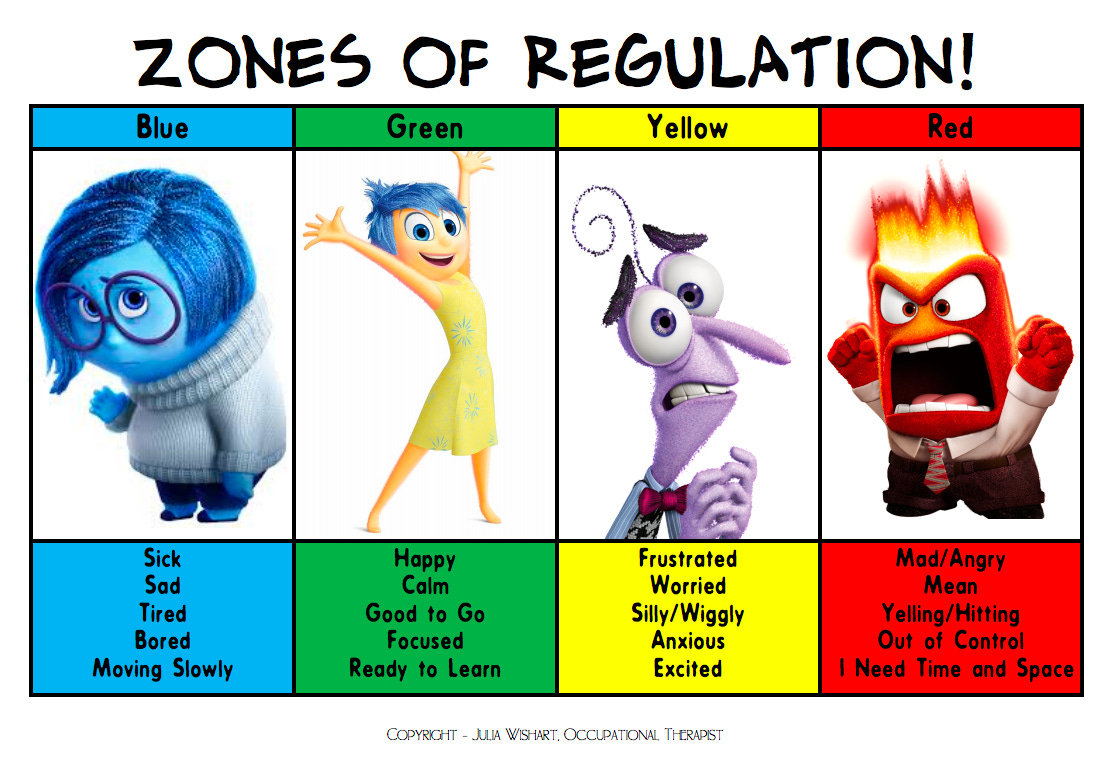
Credit: Julia Wishart, Occupational Therapist
Pixar’s Inside Out (characters pictured above) brought the zones of regulation to life. As helpfully illustrated, the red zone is temporary insanity.
Returning from red to green is the focus of countless IEPs and behavior support plans for students. Strategies include controlled breathing, moving to calm spaces, engaging with comfort objects, going for a walk, getting a drink, taking a break, and talking to a trusted adult. All good things and helpful solutions, depending on the child.
British Columbia’s K-12 curriculum identifies emotional self-regulation as a facet of Personal Awareness and Responsibility, one of the few official core competencies that all students in K-12 must develop.
students must “understand their emotions, regulate actions and reactions, persevere in difficult situations, and understand how their actions affect themselves and others” (condensed).
That’s true for students. Now let’s bring this back to educators.
Dysregulated teachers lose all credibility
In Essential Truths for Teachers, Danny Steele and Todd Whitaker write that “When a student is misbehaving, the teacher needs to make sure the student is the only one misbehaving.”
Unfortunately, we’ve all seen teachers misbehaving in classrooms. It’s not pretty.
Sure. The raging teacher might get some compliance for a while. Maybe.
But that’s a very cheap and short-term win. It doesn’t last.
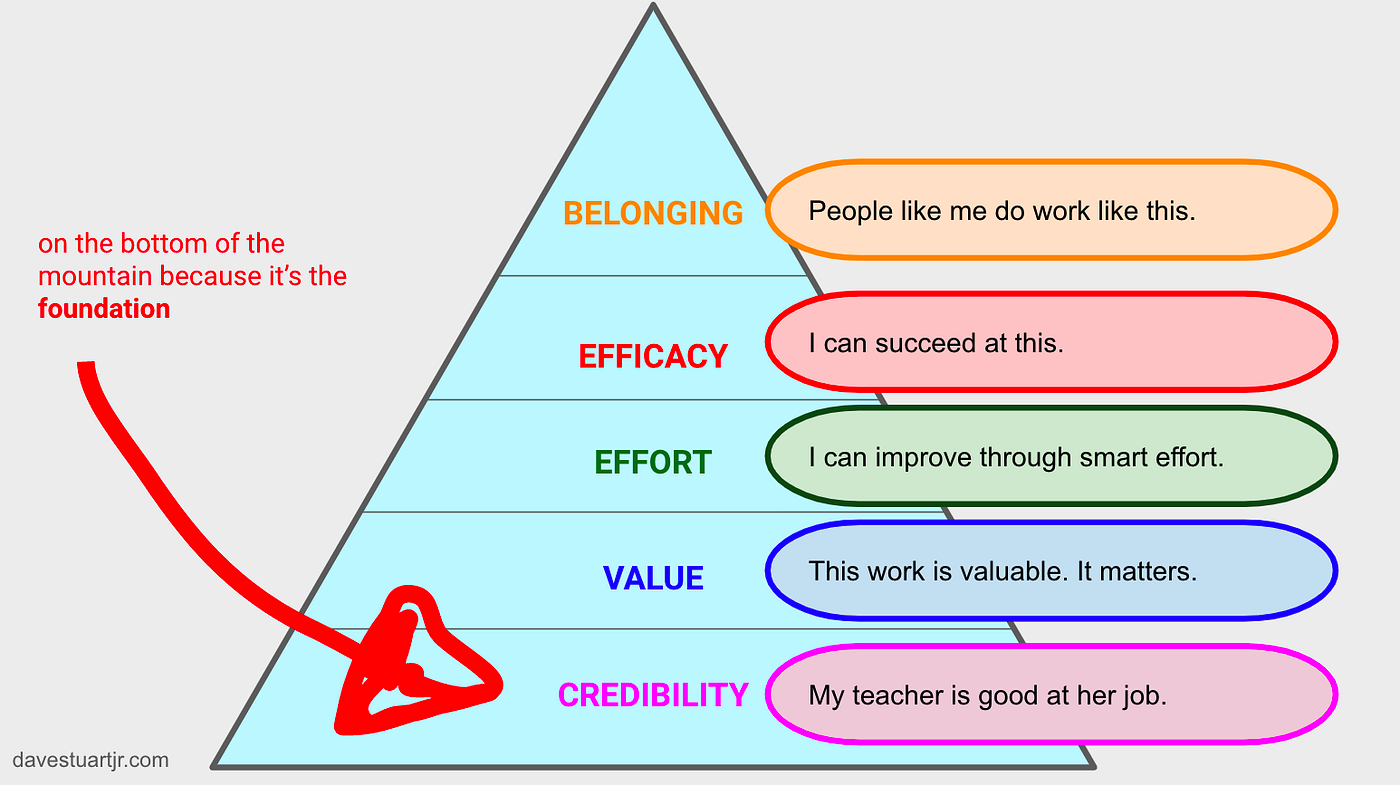
The unfortunate fact is that dysregulated teachers lose credibility in the eyes of their students. And teacher credibility, according to Dave Stuart Jr., is the bedrock of student beliefs. It’s where student success begins.
Like it or not, students don’t consider us to be competent professionals when we’re throwing tantrums like a toddler.
At best, they’ll respect us less and simply become less cooperative. They’ll offer fewer responses during discussions. They’ll be slower to respond to instructions. They’ll be less likely to cooperate with requests. They’ll invest less effort in learning activities.
That’s the best case scenario.
At worst, students become downright hostile. The mood in the room becomes tense and adversarial. Episodes of student defiance multiply, leading to more teacher outbursts. “This teacher hates us” becomes the reinforced narrative, and every class becomes a battle.
What I just described is a living nightmare. It’s enough to make teachers leave the profession entirely.
Effective classroom management starts with keeping your cool no matter what
It’s this simple. If we’re looking to manage our classrooms effectively, we absolutely have to keep our cool, even in pressure situations.
Lose our minds, and it doesn’t matter what other strategies we try.



 Teachers on Fire