• How to Launch An Education Podcast: My Best Advice

    Eleven tips that will help you build your voice and amplify your impact.

    Image Source: Soundtrap on Unsplash

    I first launched the Teachers on Fire podcast in 2018. It’s been an awesome ride, and I’ve learned a LOT over the journey.

    Five years later, much of my creative energy and focus has shifted to YouTube. But recently, I’ve returned to publishing weekly episodes on the podcast as well.

    Podcasting ignites my fire a little more every time I hit that publish button. There’s so much that is beautiful and powerful, simple yet compelling about this audio-only medium.

    My podcast journey got off to a rough start

    The start of my podcasting journey was comically ugly. Very, very ugly.

    I cringe and laugh when I think about trying to record my first interview through an app that crashed five or six times throughout our conversation.

    What should have been a 20-minute conversation took about an hour. Fortunately, I had a very patient and accommodating guest for my first episode of all time.

    I was so wildly sold on the principles of growth mindset and incremental progress at the time that I could take any adversity. Things can only get better from here, I thought often. And I was right.

    Two hundred thirty-four episodes and over 279,000 downloads later, I’ve learned a thing or two about podcasting. Although the media landscape looks different than it did five years ago, podcasting is still an incredibly effective way to share your message.

    If you’re looking to launch your own education podcast, I’ve got some suggestions.

    My best advice for launching your own education podcast

    1. Define your mission, vision, target audience, and value proposition.

    Take an hour and write out clear answers to the questions below. These thoughts will form your compass and your decision filter for the life of your podcast, even if some of your ideas evolve over time.

    • Who is your target audience?
    • What’s your value proposition?
    • How will listeners benefit by listening to your content?

    2. Based on those answers, select a title for your podcast.

    This is a critical step, so think it through very carefully and follow these tips:

    a. Select a title that has available real estate (handles) on ALL the social media platforms.

    For example, I made sure that @TeachersOnFire was available for the taking on virtually every social media platform — in the podcast community, of course, but also on X, Instagram, and Facebook. Exact same spelling, same characters, same order everywhere.

    The standardized handles will make promotion and publication infinitely simpler as you get out the word about your work. Believe me – you’ll thank me later.

    b. Select a title that makes your podcast findable by educators who are simply browsing podcasts.

    This is called SEO, or search engine optimization. If you can find a way to have something about teaching or teachers or learning or schools or education in your podcast title, there’s a legitimate chance that teachers will find and follow your podcast simply based on their own searches in Google or on podcast platforms.

    That scenario is a lot less likely if your podcast title is something weird like The Mystery or vague like Important Conversations.

    c. Select a title that is simple, easy to understand, easy to remember, easy to find.

    Here’s a practical test: if the name is based on some clever pun or it’s vague or confusing or has an unusual spelling or has to be explained in any way for people every time you mention it, it’s a fail.

    Don’t fall for the temptation to make an E a 3 or something weird like that. You’ll be forever explaining, clarifying, and reminding puzzled friends or connections who are trying to find your work.

    d. Don’t select a title that someone else is already using in another space.

    This might seem obvious, but take the time to Google your podcast title. If someone somewhere is using that title for something else, you’ll be competing with that organization for search traffic.

    Early in my podcast journey I discovered a new website called Teachers on Fire that was being used by a group of Jewish rabbis in California.

    Fortunately, I think they’ve moved on from the name and the site, but you can imagine how that conflict would create problems for both of us as we each continued to grow larger. Our audiences and communities would be landing on each other’s content all the time. Frustration both ways.

    3. Choose a podcast host.

    I went with Anchor which later became Spotify for Podcasters. It was free for me at the time and still is, even after the Spotify acquisition.

    Once my sound file is uploaded to Spotify for Podcasters, it distributes my podcast to all the other podcast players (Apple Podcasts, Breaker, Castro, Pocket Casts, Spreaker, etc.) automatically.

    A huge time-saver. Did I mention it’s free?

    4. Hit record before you feel fully ready.

    Do not allow analysis paralysis to take over. You’ll never be fully ready, and your first episodes won’t be perfect.

    But you’ll learn SO MUCH from experience.

    Everything will feel slow and cumbersome at first, but you’ll learn something new every single episode and your content will slowly get better with reps.

    So do it. Hit record. Then hit publish. Get this train moving.

    Don’t overthink equipment — a $50 mic is all you need to get going.

    5. Don’t judge the success of your venture until you’re 100 episodes in.

    This was a piece of advice that I first heard on The Fizzle Show podcast and it stuck with me.

    Give yourself 100 episodes.

    Most would-be podcasters quit by episode 10 (the term for this is podfade), which is no time at all to earn visibility and loyalty.

    Give yourself a proper chance before you return a verdict on whether to continue or let it die.

    6. Interviews will grow your podcast infinitely faster than solo episodes, so go that way if possible.

    Every time you interview a guest, they share your content with their social network. This gives you amazing exposure to your target audience and puts your growth on steroids (compared to solo content).

    When you interview guests, your thinking will be pushed and stretched in ways that just can’t happen with solo content. You’ll learn a ton, and other creators will give you invaluable advice that you never knew to ask for. You’ll also build meaningful new relationships that will last for years to come.

    7. If you decide to adopt an interview format, use a video conference platform to record your episodes.

    One of COVID’s few blessings was that it made Zoom ubiquitous. Everyone has it and knows how to use it.

    The audio quality on Zoom is decent, especially if users actually have professional microphones at hand. But laptop internal mics have come a long way in the last ten years. If that’s all your guest is using, it’ll probably be fine.

    Other quality video platform recorders out there include Zencastr, Riverside, and a great video livestreaming platform called StreamYard (I use this one regularly).

    You get a couple of nice wins from using a video conferencing platform to record your interview content.

    One is that the benefit of body language allows you to establish more of a multidimensional connection with your guest — it’s a little warmer than an audio-only conversation.

    The other benefit is that the video file it produces actually allows you to publish your conversation as a video on YouTube, too.

    8. Use Adobe Audition for editing.

    Use it for your recording as well, if you decide to go with solo content on your podcast at first.

    Adobe Audition takes time to learn, but it’s super powerful. It allows you to filter out unwanted background noise and it can make voice audio sound rich and deep even if it wasn’t recorded that way.

    If your school has an Adobe subscription, you likely have free access to Audition.

    But there are plenty of simpler options in this space as well. For example, if you happen to be a Mac person, you probably already have access to Garage Band.

    9. Try to publish consistently.

    This is very hard for full-time educators.

    But listeners generally like knowing when to expect new content from you. If you can maintain a weekly schedule, that’s the gold standard.

    You’ll build loyalty and relationships with listeners that just won’t happen when your content is unpredictable.

    10. Post your audio-only files on YouTube.

    You might be thinking to yourself, Tim, I’m not talking about becoming a YouTuber here.

    Trust me. I posted all my early podcast content onto YouTube as audio-only files — never expecting them to get much traction. But weirdly enough, they did.

    Many of those audio-only episodes got hundreds of views (listens) in the months and years that followed. Thanks in large part to the incremental growth from those early episodes, my channel is monetized today.

    That means that it’s spinning off modest monthly income, supporting my creative work, and giving me another way to share my voice. That’s super cool.

    What have you got to lose?

    11. Engage in the online communities where your target audience lives.

    I’m not talking here about creating social media accounts just so that you can hop in once a week and dump a link to your latest episode. All the social media platforms hate that and are now wired to suppress that sort of spammy content. You’d be wasting your time.

    None of us have time to put hours into each and every platform, so give yourself some grace when it comes to what I’m about to say next.

    Invest in online relationships. Connect with other educators who share your passionate ideals for growth and change in education. Provide value in online communities and you’ll be building trust and visibility for your name and brand.

    There’s absolutely no way that I could have grown Teachers on Fire to what it is today without X (then Twitter). I can’t say enough about my friends and colleagues there who have cheered me on and supported my work over the years.

    The fact is that not many listeners will find you by accident. Some will, because you followed my advice and titled your podcast in a way that’s findable and search-friendly. But it won’t be many.

    The sad truth is that content creators who are not on any social media platforms struggle along in relative obscurity for months and years because literally no one knows they exist.

    That’s just the harsh truth. It’s the way online content works. You have to get in front of eyeballs — not wait for them to find you.

    So get out there. Champion your values. Get connected on X. Find Facebook groups of educators that align with your vision for education. Find other creators on Instagram or TikTok or LinkedIn who are doing the work you’re doing and can support and inspire you along the way.

    Support the work and messages of others, and they’ll be inclined to support you back.

    Final thoughts

    I’m so excited that you’re starting this journey, fellow educator.

    I remember when Adam Welcome told me that every educator should have a podcast. I’d go light on the should there, but his point is well-taken.

    The field of K-12 education needs more inspiring, positive, practical podcast content, and I know you’re ready to provide just that.

    Let me know how I can help and reach out any time.

    I’ll be cheering you on.

  • Create Quizzes from YouTube Videos Automatically with Quizizz

    It just got a whole lot easier to check student comprehension of video content. But does this feature actually support student learning?

    *Note: I have no affiliation with Quizizz.


    Education technology has been quiet for a while, it feels like. But something pretty exciting has appeared in the online quiz game space.

    Online quiz platforms have come a long way

    First, let’s zoom out and give this category of education apps some context.

    The iconic Kahoot first appeared in 2013. Can you believe that?

    Since then, it feels like it’s ruled the review quiz space, by and large.

    Everyone knows Kahoot.

    But other apps and companies have also appeared over the years, and each one boasts interesting features that the others do not. Even as Kahoot slowly evolves forward and adds its own features, teachers can now choose from Blooket, Gimkit, Quizizz, or Quizlet.

    I can’t profess to be a high-level expert on the ins and outs of every platform. A side-by-side comparison of each one (including differences between free and premium plans) would be fun.

    Perhaps edtech author, speaker, and podcaster Jake Miller could tackle that little project. Jake?

    New from Quizizz: AI-created quizzes from selected YouTube videos

    In the meantime, I can tell you this.

    Quizizz is putting artificial intelligence to work for teachers.

    Quizizz now allows teachers to create review quizzes automatically from any YouTube video (provided it has captions, including auto-captions, which most videos do).

    Drop the YouTube link and watch Quizizz do its magic.

    Wow.

    But Quizizz isn’t done.

    It can also apply the same quiz-making skills to any .PDF, .Doc, or .PPT file.

    Want to paste in a big body of text?

    No problem. It can do that, too.

    For FREE. As of the time of writing, you could perform this magic from a Basic account.

    Time to test this YouTube-video-to-automatic-quiz feature out

    I was skeptical at first. There’s no way this can work quickly and well, I thought.

    Turns out it can.

    I tested Quizizz on two YouTube videos. The first video was from fifth grade Social Studies, related to the government structures. The second was from sixth grade Science, related to Isaac Newton’s three laws of motion.

    Both were short videos (under three minutes), so I knew the Quizizz AI wasn’t getting a huge amount of text from which to formulate questions.

    It didn’t struggle at all. Ten decent multiple choice questions and answers for each video.

    But does this feature actually support student learning?

    Hold on, Cavey. Let’s make sure we’re not just rushing after the latest shiny object.

    All-important is this question: does this app or feature support student learning? If so, how?

    I think it does, although not in profoundly significant ways. Here’s what I mean.

    Let’s take the second video that I tested in Quizizz — Newton’s Laws of Motion (Motion, Force, Acceleration).

    I might show that video in connection with a learning target (derived from our sixth grade Science curriculum) that looked like this:

    🎯 I can define and identify Newton’s three laws of motion.

    Quizizz had no problem spitting out 10 decent multiple choice questions based on this short video (2:37). Bravo!

    But let’s talk about depth of knowledge for a second. Even if a student scored a 10/10 on my little quiz (and note that I don’t record any numbers in my gradebook whatsoever), would I consider that evidence of full proficiency?

    I’m not so sure that I would.

    I would want more evidence. Better quality evidence. Other kinds of representations of this learning that require a little more from the learner and demonstrate greater depth of knowledge.

    The same goes for all of these review platforms. We don’t take student results from Blooket or Kahoot and throw them in our gradebook. Right?

    Hmmm.

    Three nice wins from this feature

    Here’s where I think these AI-powered features really add to the teaching and learning experience.

    1. They will give teachers another source of formative assessment.

    Wondering if your students are grasping the basics of Newton’s three laws? Your quiz results will give you a decent signal.

    Will student scores give you a rock-solid picture of the depth of their understanding? As I wrote above, no. Will they help? Yes, particularly on a macro (whole-class) level.

    2. They will increase student engagement.

    It’s my anecdotal observation of middle schoolers that when multiple choice quizzes come out, most students come to play.

    They’re engaged. They’re focused. They’re aiming to demonstrate their knowledge and understanding.

    And because of that fact, I know I’ll also get higher engagement when I show the video itself. Simply by saying with a smile “And I’ve got a 10-question quiz to follow, so pay close attention!” I know students will be more engaged.

    Am I leveraging performance anxiety to increase engagement? I don’t think so. I mean, I don’t even record numbers in my gradebooks. None at all.

    And it should go without saying that I’m not going to embarrass or humiliate a student for a poor showing.

    All I’m trying to do here is press a little button that says I care about your comprehension of this material, and because I care, I’d like to see some evidence.

    That knowledge alone is enough to activate more attention and interest in most students.

    3. They will save teachers time.

    In 2023, teacher sustainability is everything. Seriously.

    As we ask more from teachers than ever before, we have to have to have to find ways to save teachers time and energy.

    This feature is one way to do it. A year ago, it probably took your average teacher 20–30 minutes to make a review quiz on one of these platforms.

    No more. Powered by some awesome AI, Quizizz will do it for teachers in a matter of seconds. That’s a welcome savings.

    Final thoughts on Quizizz AI

    I’m excited about this step forward for review games, and I’m 95% sure it’s not just the nerdy technophile side of me speaking.

    These quizzes will save teachers time, increase student engagement, and give teachers another source of formative assessment that will guide their next instructional decisions.

    And it’s FREE. Did I mention that?

    If you’re new to Quizizz but want to give it a try, check my latest edtech tutorial.

  • Should Teachers Use This New Google Classroom Feature?

    Does ‘Close submissions after due date’ support student learning and development?

    Google Classroom recently introduced a new feature in assignment settings. Teachers can now select ‘Close submissions after due date.’

    I have no doubt that some teachers reacted warmly to this development. Late assignment submissions drive some teachers mad. They cost time and energy.

    So the ability to shut the door on late submissions is an appealing option.

    But just because the option is there doesn’t necessarily mean it’s the right course for student learning.

    Whenever it comes to tricky pedagogical, policy, or program decisions, I like to fall back on these two questions:

    • Is this good for kids?
    • Is this good for student learning?

    Guided by this simple filter and after giving this some serious thought, here’s where I’m landing on Google Classroom’s newest feature for now.

    Four thoughts on the ‘Close submissions after due date’ option

    1. If our number one mission is student learning, I would hope that our posture is that whenever students want to submit evidence of their learning, we want to accept it.

    We can’t always, but we want to or we wish we could, right?

    That’s a very general principle that requires qualifications (see points 3–4 regarding teacher limitations and sustainability), but I think if our mission is truly student learning, it’s important to at least aim for that posture as a starting point.

    If students want to show us evidence of their learning, as a general default we’d like to see it, or at the very least have access to it.

    2. I sure hope we’re not leveraging that feature in order to scare students into assignment completion and submission.

    Please, no.

    If we’re checking the box beside this option, we’d better be thinking through our policy carefully. If an assignment was due on Tuesday and the student wants to submit it on Wednesday but is shut out by this setting, what happens next?

    Because I’ll tell you one thing we’re definitely NOT doing.

    We’re not recording zeros for unsubmitted work. Zeros obliterate any remnants of possible meaning or significance from report cards.

    As Tom Schimmer says, if an athlete doesn’t show up for a 100 meter dash, we don’t assume they have zero running ability.

    That would be intellectual laziness. No one in the track world would treat that as a serious conclusion.

    If an athlete doesn’t show up for a race, it means that we simply don’t have the evidence that we need to properly assess their running ability.

    Unless we have access to other data, their ability to run 100 meters remains completely unknown.

    In my proficiency scale (standards-based grading) context, we’re also not going to record a student’s learning as Emerging. That would be the same idea as a zero.

    Remember, if we’re recording zeroes or assessments of Emerging proficiency, we’re no longer trying to honestly measure learning against curricular standards.

    All we’re doing is leveraging grades as punishment and rewards.

    And that makes our gradebooks a joke, because now the grade says more about compliance than ability.

    3. I would hope that if we use this feature, we use it in a way that opens the door to student conversations and growth.

    Maybe there’s a simple conversation or appeal or application process that the student must complete in order to be allowed to submit their assignment.

    Whatever this looks like, I can see some positive potential here. Some character and regulation formation in the student. Some deepening of the teacher-student relationship.

    Note that this will actually require more time and energy from the teacher than if the feature was not turned on. But if a teacher is willing to go this path, I applaud them.

    Seriously, they’re a rock star. They’re deeply invested.

    Student learning, development, and self-regulation skills could win as a result of this kind of policy.

    4. The reality we can all agree on: teachers are limited by time and human capacity.

    Teachers already cannot assess every piece of work that students touch.

    When we do find the time and priority to assess student work, it needs to be done as much as possible in one chunk, one session.

    What I’m getting at here is that teachers simply cannot sit down to assess 15 submissions, then a few days later assess three more, then a few days later one more, then a few days later three more.

    Extrapolate that kind of ridiculousness across dozens of students and learning activities and you’ve got a great recipe for teacher insanity or depression or both.

    We also quite literally cannot accept submissions forever.

    The end of term or semester is generally a hard cap, but even within the term, it’s not reasonable for teachers to assess submissions in November that were due in September.

    So for that reason I think there’s at least an argument to be made for closing the door on learning activities and moving on at some point.

    Privately, I would hope that the door on submissions doesn’t slam shut at midnight on the due date. Google Classroom does offer a switch that blocks future submissions at any arbitrary time, so teachers could do this manually a week or so after due dates if they chose.

    But let’s be real and say that ultimately, the door on submissions does have to close at some point.

    Will I use this feature?

    No.

    One of my core values as a teacher has long been this: late is better than never. As long as the assignment submission is there for me by the time I assess it, we’re good.

    For me to shut the door quickly on assignment submissions, I have to be able to make the reverse case: never is better than late.

    That’s a very, very tough position to defend pedagogically.

    But should all teachers go my way? Not necessarily.

    As I wrote in point 3 (above), I can see a best use case for this feature that results in increased learning, character formation, and self-regulation skills in students.

    It would take a serious commitment on the part of teachers. It would cost them more time and energy, and as a part-time administrator I worry about that.

    But for teachers willing to take this strategy seriously, I can see the potential wins. And I’ll cheer you on as you do it.

  • Warn Your Teaching Teammates Before Doing the Fun Stuff

    A quick heads up shows respect for your teammates and protects team unity.

    Photo Source: Scholastic.com

    I just know that some teacher out there is going to look at this title and ask “Why can’t all of your learning be fun?”

    Come on. Let’s be real for a second.

    Yes, we always want learning to be fun.

    We bring the hype and the noise and the smiles and the interactivity and the creativity and the technology and the gamification whenever and wherever we can.

    But the reality of your typical classroom is that students aren’t calling it fun every single minute of every day, even if they like you, they’re grateful for the class, and they’re glad to be there.

    You can live in denial of that fact or you can accept it. It’s a fact.

    By “fun activities,” I’m talking about the Big Fun Deals, or BFDs. The stuff students talk about in the hallways.

    The crazy review games. The slurpee treats. The movies. The mind-blowing projects. The spontaneous walks outside of the school. The potluck lunches. The pizza parties. Dance-offs. Ice cream sundaes.

    There can be times and places for all of those things. But let me give you this tip: give your teaching team a heads up before doing them.

    This is my 23rd year of teaching, and I’ve been on both sides of this equation.

    Sometimes I’ve been the teacher suddenly doing a Big Fun Deal with my students.

    Sometimes I’ve been the neighbor teacher who is doing “normal stuff” while the classroom next door suddenly explodes with loud music, smells of pizza, and roars of laughter for an entire block.

    Not every class will always be doing the exact same thing at the exact same time, even within a grade level. That’s just school life.

    And some teachers will ultimately become known as “the fun teacher.” More power to them. Those reputations are generally earned through consistent sacrifice, kindness, smiles, laughter, and emotional generosity.

    Just give them a heads up first

    But the point of the post is this: when you’re planning a Big Fun Deal in your room, give your teaching teammates a bit of a warning.

    That gives them a chance to mentally prepare. To plan a similar version of your Big Fun Deal. Or even to join in on it.

    It’s not to say that if they don’t have the advance notice, catastrophe will follow. Not at all. They may be totally cool with your BFD and simply encourage their own students to carry on with whatever their planned learning activity is at the time.

    They may cheer you on and that is that.

    But the other possibility is that they may feel sideswiped. Like you’re trying to one-up them. Like you’re trying to carve out a lane as Hero Teacher by carefully crafting your Big Fun Deal out of sight so that they can’t take part or they’re left looking boring.

    That may not have been your intention at all, but that’s how it can come across.

    This message doesn’t come from any recent experience — just a couple of decades in the biz.

    If unity and cohesion is important to you and your teaching team — and I sure hope it is — keep your colleagues in the know.

    And then lean into that Big Fun Deal like it’s 1999.

    How to Make an Awesome Scoreboard in Canva

  • The Magic and Misery of Student Video Submissions

    Allowing students to represent their learning through video creates exciting possibilities and serious challenges to our sanity at the same time.

    Image Source: Apple

    I’m a big believer in allowing our students to represent their learning in as many different ways as possible.

    Writing is the conventional means for this, and don’t dump on it. Effective writing is as powerful and important as ever, says this English major.

    The keyboard is still mightier than the sword, notwithstanding the trolls.

    But students can also represent their learning through drawings, posters, brochures, magazines, slideshows, animations, group presentations, speeches, plays, audio recordings, and a host of other expressions.

    They can also use video recordings.

    The magic of video submissions

    When I started teaching in 2001, there was no way for students to represent their learning through video and share it effectively.

    We didn’t have iPads or Chromebooks back then. We didn’t even have wifi.

    By comparison, students and teachers of today have an embarrassment of riches at our disposal. Using tools like Seesaw and Canva, students can record picture-in-picture videos or screencasts that include explanations and demonstrations of their learning.

    There are probably hundreds of specific applications of video in the classroom, but here are three of my current favorites:

    1. Writing piece read-alouds

    Any time my English students complete a piece of writing of any significance, I ask them to read it aloud on Seesaw in the form of a screen recording. By zooming in on their text (usually a Google Doc) as they read, students allow their parents to follow along on their own devices while they listen to their child.

    This practice is such a no-brainer for any middle school language classroom. It positions students to truly own their writing, refine and revise their texts (they always discover mistakes when they read them aloud), and strengthen their oral communication skills — another important curricular standard.

    2. Video reflections after independent reading

    Our students sometimes feel like every time they turn around, they’re writing another reflection. I think reflections are good practice for lots of reasons, but we can also mix it up a little bit. They don’t always need to be typed or written, and students generally appreciate the change-up.

    Here’s an activity from my Seesaw library that I can re-post in a few clicks after any independent reading period. It meets curricular standards, requires critical thinking, strengthens oral communication skills, and provides some gentle accountability.

    Wins all around.

    3. Math solution demonstrations as screencasts

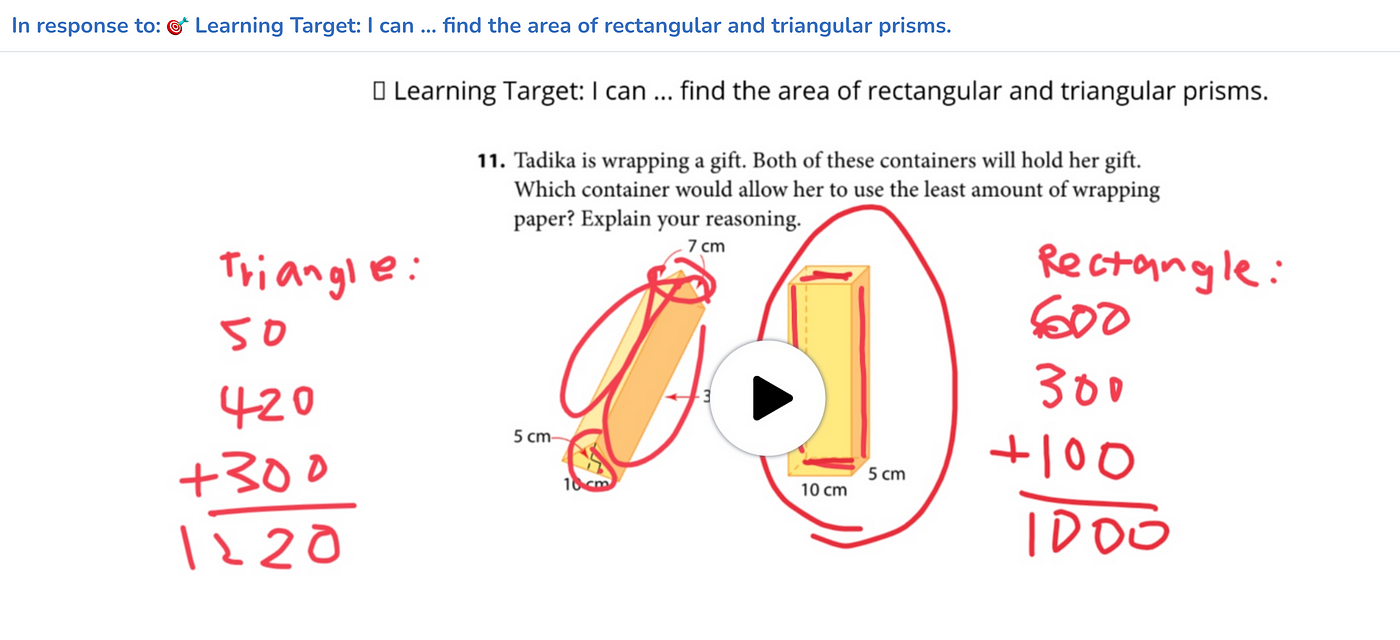
    When I’m teaching Math, I like to ask students to demonstrate their solution to a problem as a narrated screen recording.

    This gives me so much more information than simply “Did they find the right answer?” I can watch, listen, track their understanding and observe their whole process. Depth of proficiency is all right there.

    The video becomes another helpful artifact in their learning journal. And the student’s parents can see precisely where their child’s learning is, too.

    It’s a thing of beauty.

    The misery of video submissions

    Now it’s time to face the bitter truth about video submissions.

    They take forever to fully review.

    FOREVER.

    I taught 160 unique middle school students each semester this year as part of my 60% teaching time. (We’ll stay focused today and ignore the fact that my 40% admin time took up about 80% of my energy.)

    Let’s say that in the course of one week, I assigned each of my 160 students a learning activity that required submission of a video. (I know the UDL advocates will speak up to say that I should be offering more choices for means of representation, but work with me, folks.)

    Let’s say that each of those 160 students submits a video that averages three minutes in length. That’s eight hours of viewing.

    Now I know I don’t have to watch every single video in its entirety, but you see my point. When you put those hours beside all my other teaching and administrative duties, the time quickly becomes impossible. Absurd, even.

    Some of my dear students sincerely expect me to watch every second of everything they post. Bless their hearts, but I can’t meet that demand and stay sane at the same time.

    What are we to do?

    Should we just give up and avoid video submissions altogether?

    The good news about video activities

    Thankfully, I bring you glad tidings of great joy, tired teacher. We don’t have to grade everything. We don’t have to offer feedback on everything, either.

    I first encountered this word of hope from Dylan Wiliam and Siobhan Leahy in Embedding Formative Assessment:

    “The most important takeaway from the research is that the shorter the time interval between eliciting the evidence and using it to improve instruction, the bigger the likely impact on learning.”

    I draw three conclusions from this quote, and friend, they are important.

    1. The feedback I offer my students in real time has the greatest impact of any feedback they receive.

    This is as true on the basketball court or in the band room as it is in my English classroom. So I engage, interact, look over shoulders, sit with students, observe what they’re doing, ask questions, offer feedback, and support their learning whenever and wherever I can during class time.

    2. The feedback I offer my students hours or days or even weeks after the fact isn’t too valuable.

    You know those five hours you spent last Saturday posting feedback on student work? Not a great return on your investment, research suggests.

    That’s not to say that we should never offer feedback or grade student work long after the time of completion. I do so when it seems important to, especially when I’m relying on particular pieces of evidence of learning to construct an accurate picture of a student’s progress.

    But I weigh my investment of attention and energy against the time that has elapsed since the student completed the work. The greater the gap, the less impact my feedback or assessment is likely to have on their learning.

    3. Learning activities can often support student learning, even without feedback or assessment from the teacher.

    Look at the three examples of video submissions that I listed above. I would argue that each and every one is valuable for the student to complete, whether or not I offer feedback or assess the activity.

    Yes, sometimes I will offer feedback during class or after it. But other times I can’t and won’t. And that’s okay, because the student is still winning.

    They’re still thinking critically.

    They’re still demonstrating their knowledge and understanding.

    They’re still strengthening their oral communication skills.

    They’re still reflecting on their learning.

    My students don’t receive points or percentages for anything they do, so I hardly ever hear “Is this for marks?” or “Will this be graded?”

    For the most part, they just do it. Because that’s the culture we’ve built.

    And I sleep with the satisfaction of knowing they are moving their own learning forward.

    Learning can happen without us, not to mention the possibilities afforded by peer- and self-assessment. Sometimes we need to drop the hero complex and remember that the children in our care have the capacity to learn and grow on their own.

    Even if we don’t always see their finished product? (Gasp.)

    Yes.

    That’s not an abdication. It’s a recognition of student agency.

    Image Source: Apple

    Dig it or ditch it? The final verdict on video representations of learning.

    I’ve shown you the magic.

    I’ve detailed the misery of the time it takes to actually review every video submission.

    And I’ve assured you that by opening the door to these representations of learning, you’re not actually kissing your sanity goodbye.

    So I say dig it.

    Offer feedback and coaching in the moment. Offer likes and encouragement whenever you can. Grade work and provide assessment when you must.

    Don’t drive yourself crazy, but take this tool out of the toolbox.

    What happens next just might bring back some of your fire for learning.

    And your community will be better for it.